What Is the Google Display Network?
If you’ve ever visited a website and later noticed advertisements for the same product on another website, YouTube, or even inside Gmail, you’ve experienced the Google Display Network (GDN) in action.
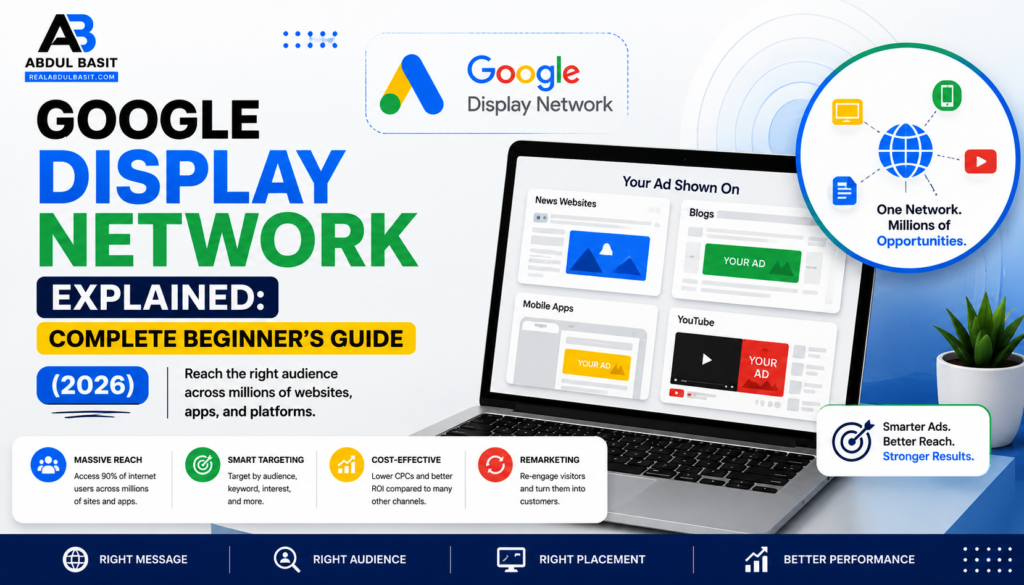
The Google Display Network is one of the world’s largest online advertising networks. It allows businesses to display visual advertisements across millions of websites, blogs, mobile applications, YouTube, and Gmail. Unlike Google Search Ads, which appear when someone searches for a keyword, Display Ads appear while people browse the web, read articles, watch videos, or use mobile apps.
For businesses, this means the ability to reach potential customers long before they’re ready to make a purchase. Instead of waiting for someone to search, you introduce your brand while they’re exploring content online.
Google estimates that the Display Network reaches more than 90% of internet users worldwide, making it one of the most powerful platforms for building brand awareness and attracting new customers.
How Does the Google Display Network Work?
Google uses advanced algorithms to match advertisements with users who are most likely to be interested in a business.
When creating a Display campaign in Google Ads, advertisers choose who they want to reach. Google then places their advertisements across relevant websites and applications within the Display Network.
Instead of relying only on search keywords, Google considers multiple signals, including:
- User interests
- Browsing history
- Website content
- Demographics
- Geographic location
- Device type
- Previous interactions with your website
- Purchase intent
For example, imagine someone visits your online shoe store but leaves without making a purchase. After they leave, your advertisements may appear while they’re reading news articles, browsing blogs, or watching YouTube videos. This strategy is known as remarketing, and it’s one of the most effective features of the Google Display Network.
Why Businesses Use Google Display Network
Many businesses invest in Display advertising because it helps them stay visible throughout the customer’s buying journey.
Instead of relying only on search traffic, businesses can continuously remind potential customers about their products or services.
Some of the biggest advantages include:
- Massive audience reach
- Strong brand awareness
- Affordable advertising costs
- Visual advertisements that attract attention
- Advanced audience targeting
- Remarketing opportunities
- Flexible budgeting
- Measurable campaign performance
Whether you’re promoting an eCommerce store, SaaS product, local business, or personal brand, Display campaigns can help increase visibility and generate qualified traffic.
Where Can Your Ads Appear?
One of the biggest strengths of the Google Display Network is its enormous reach.
Your advertisements may appear on:
- News websites
- Technology blogs
- Business websites
- Sports websites
- Entertainment portals
- Recipe websites
- Finance websites
- Mobile applications
- YouTube
- Gmail
- Google’s partner websites
Because Google works with millions of publishers, advertisers can reach customers almost anywhere they spend time online.
Types of Google Display Ads
Google offers several display advertising formats designed for different marketing objectives.
Responsive Display Ads
Responsive Display Ads are Google’s recommended format.
Advertisers upload:
- Headlines
- Descriptions
- Images
- Logos
Google automatically combines these assets into advertisements that fit different screen sizes and placements.
This automation helps improve campaign performance while reducing the need to design multiple ad sizes.
Image Ads
Image Ads use professionally designed graphics to capture attention.
These advertisements are excellent for:
- Product launches
- Seasonal promotions
- Brand awareness
- Retail offers
Strong visuals often produce higher engagement than text-only advertisements.
Animated Display Ads
Animated advertisements include simple motion effects that attract user attention without being distracting.
Many brands use animated banners to showcase multiple products or demonstrate product features.
Gmail Ads
Gmail Ads appear inside users’ Promotions or Social tabs.
These ads look similar to regular emails until clicked, making them useful for promoting offers, newsletters, webinars, and product launches.
Google Display Network vs Google Search Network
Many beginners assume both advertising networks work the same way, but they serve different purposes.
| Google Search Network | Google Display Network |
|---|---|
| Targets active searches | Targets browsing users |
| Text advertisements | Visual advertisements |
| High purchase intent | Builds awareness |
| Keyword-based targeting | Audience-based targeting |
| Captures existing demand | Creates future demand |
Search campaigns perform well when customers already know what they need.
Display campaigns perform well when businesses want to introduce their brand to new audiences or stay visible throughout the buying process.
Most successful advertisers combine both networks instead of choosing one over the other.
When Should You Use Google Display Network?
Google Display campaigns work particularly well if your goal is to:
- Increase brand awareness
- Launch a new product
- Promote seasonal offers
- Generate website traffic
- Build remarketing audiences
- Increase online sales
- Stay ahead of competitors
- Reach potential customers early in their buying journey
Businesses that consistently appear across multiple websites often build stronger brand recognition than competitors relying only on search advertising.
Why Google Display Network Is Important in 2026
Digital advertising continues evolving as artificial intelligence improves audience targeting and campaign automation.
Today’s Display campaigns can automatically optimize placements, bids, creatives, and audiences using machine learning, helping advertisers achieve better results with less manual work.
Combined with high-quality creatives and effective landing pages, the Google Display Network remains one of the most valuable tools for businesses looking to grow online.
Google Display Network Targeting Options
One of the biggest advantages of the Google Display Network is its powerful targeting capabilities. Instead of showing your ads to everyone, Google helps you reach people who are most likely to become customers.
Below are the main targeting methods available in Google Ads.
Audience Targeting
Audience targeting allows you to reach users based on their interests, online behavior, and purchase intent.
Popular audience options include:
- Affinity Audiences (long-term interests)
- In-Market Audiences (users actively researching products)
- Custom Segments
- Customer Match
- Similar Audiences
- Life Events (moving, graduating, getting married)
For example, if you sell fitness equipment, you can target users interested in health, exercise, and sports.
Demographic Targeting
Google allows advertisers to narrow audiences using demographic information such as:
- Age
- Gender
- Household Income
- Parental Status
This prevents your budget from being spent on users who are unlikely to convert.
Geographic Targeting
Location targeting is especially valuable for local businesses.
You can advertise to people in:
- Countries
- States
- Cities
- ZIP or Postal Codes
- Custom Radius around your business
Local targeting reduces wasted clicks while increasing campaign relevance.
Placement Targeting
Placement targeting lets you choose exactly where your advertisements appear.
You can display ads on:
- Specific websites
- YouTube channels
- Mobile applications
- Individual webpages
This method gives advertisers maximum control over ad placement.
Contextual Targeting
Google analyzes webpage content and automatically places your advertisements on websites related to your products or services.
For example:
A business selling camping equipment may have ads displayed on outdoor travel blogs or hiking websites.
Remarketing
Remarketing is one of the most effective Google Display Network strategies.
Instead of targeting new visitors, remarketing shows advertisements to people who have already interacted with your business.
Examples include users who:
- Visited your website
- Added products to their cart
- Watched your YouTube videos
- Downloaded a guide
- Submitted a lead form
Remarketing usually delivers higher conversion rates because users are already familiar with your brand.
How to Create a Google Display Campaign
Launching a Display campaign is straightforward when you follow the correct process.
Step 1: Create a Campaign
Inside Google Ads:
- Click New Campaign
- Select your marketing objective
- Choose Display Campaign
Google will then guide you through campaign setup.
Step 2: Set Your Budget
Choose either:
- Daily Budget
- Campaign Total Budget
Start with a manageable budget while collecting performance data.
Increase spending only after identifying profitable campaigns.
Step 3: Select Your Bidding Strategy
Google offers several bidding options.
Popular choices include:
- Maximize Clicks
- Maximize Conversions
- Target CPA
- Target ROAS
- Manual CPC
New advertisers often begin with Maximize Conversions, while experienced advertisers may prefer Target ROAS for eCommerce campaigns.
Step 4: Build Your Audience
Select the audience most likely to purchase your product.
You can combine:
- Interests
- Demographics
- Keywords
- Placements
- Customer Lists
- Remarketing Audiences
Combining multiple targeting signals usually improves campaign performance.
Step 5: Create Your Display Ad
Your advertisement should include:
- Attention-grabbing headline
- High-quality image
- Company logo
- Compelling description
- Strong Call-to-Action (CTA)
Responsive Display Ads automatically adjust to different websites, making them the preferred option for most advertisers.
Best Practices for Google Display Network
Professional advertisers continuously optimize their campaigns instead of launching them and forgetting about them.
Some proven best practices include:
- Use high-quality images.
- Create multiple ad variations.
- Write benefit-focused headlines.
- Match landing pages with your advertisements.
- Install Google Ads conversion tracking.
- Review placement reports regularly.
- Exclude poor-performing websites.
- Refresh creative assets every few weeks.
- Test different audience segments.
- Optimize based on conversion data—not clicks alone.
Small improvements can significantly increase Return on Ad Spend (ROAS).
Common Google Display Network Mistakes
Many advertisers lose money because they repeat common mistakes.
Avoid these issues:
- Targeting audiences that are too broad.
- Ignoring remarketing campaigns.
- Using low-quality images.
- Sending traffic to a generic homepage.
- Forgetting conversion tracking.
- Never reviewing campaign reports.
- Running only one ad creative.
- Stopping campaigns before enough data is collected.
Successful Display advertising requires patience, testing, and ongoing optimization.
Measuring Campaign Success
Don’t judge your campaign by clicks alone.
Monitor these key performance indicators (KPIs):
- Impressions
- Click-Through Rate (CTR)
- Cost Per Click (CPC)
- Cost Per Acquisition (CPA)
- Conversion Rate
- Return on Ad Spend (ROAS)
- View-Through Conversions
Tracking these metrics helps you understand what’s working and where improvements are needed.
Real-World Example
Imagine you own an online furniture store.
A visitor browses your dining tables but leaves without making a purchase.
Because you’ve installed the Google Ads remarketing tag, that visitor later sees your furniture ads while reading news articles, watching YouTube videos, or browsing lifestyle websites.
A few days later, they return to your website and complete the purchase.
Without the Google Display Network, that potential customer might never have come back.
Advantages of Google Display Network
The Google Display Network (GDN) offers businesses an effective way to reach potential customers across millions of websites, apps, YouTube, and Gmail. Whether you’re a small business or a global brand, GDN provides several advantages.
Some of the biggest benefits include:
- Reach over 90% of internet users worldwide.
- Increase brand awareness with visual ads.
- Target users based on interests, demographics, and behavior.
- Reconnect with previous website visitors using remarketing.
- Support every stage of the customer journey.
- Flexible budgets suitable for businesses of all sizes.
- Measure campaign performance with detailed reporting.
- Improve conversions through AI-powered optimization.
Because Display campaigns introduce your brand before customers actively search, they complement Search campaigns and strengthen your overall digital marketing strategy.
Disadvantages of Google Display Network
Although GDN is powerful, it also has limitations.
Some common challenges include:
- Lower click-through rates than Search Ads.
- Requires strong visual creatives.
- Brand awareness campaigns may not generate immediate sales.
- Poor audience targeting can waste advertising budget.
- Regular optimization is necessary for the best results.
Fortunately, these challenges can be minimized through proper campaign management and ongoing testing.
Google Display Network Optimization Checklist
Use this checklist to improve campaign performance:
✔ Install Google Ads Conversion Tracking.
✔ Connect Google Analytics.
✔ Create Responsive Display Ads.
✔ Use high-quality images and logos.
✔ Write multiple headlines and descriptions.
✔ Test different audience segments.
✔ Build remarketing audiences.
✔ Exclude poor-performing placements.
✔ Review search insights regularly.
✔ Optimize landing page speed.
✔ Improve your website’s mobile experience.
✔ Monitor CTR, CPA, and ROAS weekly.
Consistently reviewing these factors can significantly improve campaign performance over time.
Google Display Network vs Social Media Advertising
Many businesses compare Google Display advertising with platforms like Facebook, Instagram, TikTok, or Snapchat.
| Google Display Network | Social Media Advertising |
|---|---|
| Appears on websites, apps, Gmail, and YouTube | Appears inside social media platforms |
| Strong remarketing capabilities | Excellent audience engagement |
| Contextual and audience targeting | Interest and behavior targeting |
| Large publisher network | Platform-specific audiences |
| Great for brand awareness and retargeting | Great for engagement and community building |
For most businesses, combining Google Display with social media advertising produces the best overall results.
Who Should Use Google Display Network?
The Google Display Network is suitable for almost every type of business, including:
- eCommerce stores
- Local businesses
- SaaS companies
- B2B businesses
- Digital agencies
- Healthcare providers
- Educational institutions
- Travel companies
- Real estate agencies
- Personal brands
If your goal is to increase visibility and stay in front of potential customers, GDN is an excellent choice.
Frequently Asked Questions
Is Google Display Network good for beginners?
Yes. The platform is beginner-friendly, especially when using Responsive Display Ads and automated bidding strategies. New advertisers should start with smaller budgets while learning campaign optimization.
What is the difference between Google Search Ads and Google Display Ads?
Google Search Ads appear when users actively search for keywords, while Google Display Ads appear across websites, apps, YouTube, and Gmail as users browse online. Search Ads capture existing demand, whereas Display Ads help create awareness and keep your brand visible.
How much does Google Display advertising cost?
There is no fixed price. Costs depend on factors such as your industry, audience competition, bidding strategy, targeting options, and campaign objectives. Businesses can start with a small daily budget and scale based on performance.
Are Display Ads effective?
Yes. When combined with accurate targeting, high-quality creatives, and conversion tracking, Display Ads can increase brand awareness, generate leads, and improve sales.
Should I use remarketing?
Absolutely. Remarketing is one of the highest-performing features of the Google Display Network because it targets users who have already shown interest in your business.
Final Verdict
The Google Display Network remains one of the most effective digital advertising platforms in 2026. With access to millions of websites and apps, advanced audience targeting, AI-powered optimization, and powerful remarketing capabilities, it enables businesses to reach potential customers throughout every stage of the buying journey.
However, success doesn’t come from simply launching a campaign. It requires thoughtful audience targeting, engaging ad creatives, fast-loading landing pages, conversion tracking, and continuous optimization. Businesses that regularly analyze campaign data and test new strategies are far more likely to achieve higher click-through rates, lower acquisition costs, and stronger return on ad spend (ROAS).
Whether you’re promoting an online store, generating leads, increasing brand awareness, or launching a new product, the Google Display Network should be an essential part of your digital marketing strategy.
Suggested Internal Links
Strengthen your website’s SEO by linking to related articles, such as:
- Google Ads Management
- Google Ads Pricing Explained
- Google Search Ads vs Display Ads
- Search Ads vs Google Ads: What’s the Difference?
- Meta Ads vs Google Ads: Which Is Better for Beginners?
- How to Scale Meta Ads Without Increasing CPA
Suggested External Links
Include links to trusted resources to improve your article’s authority: