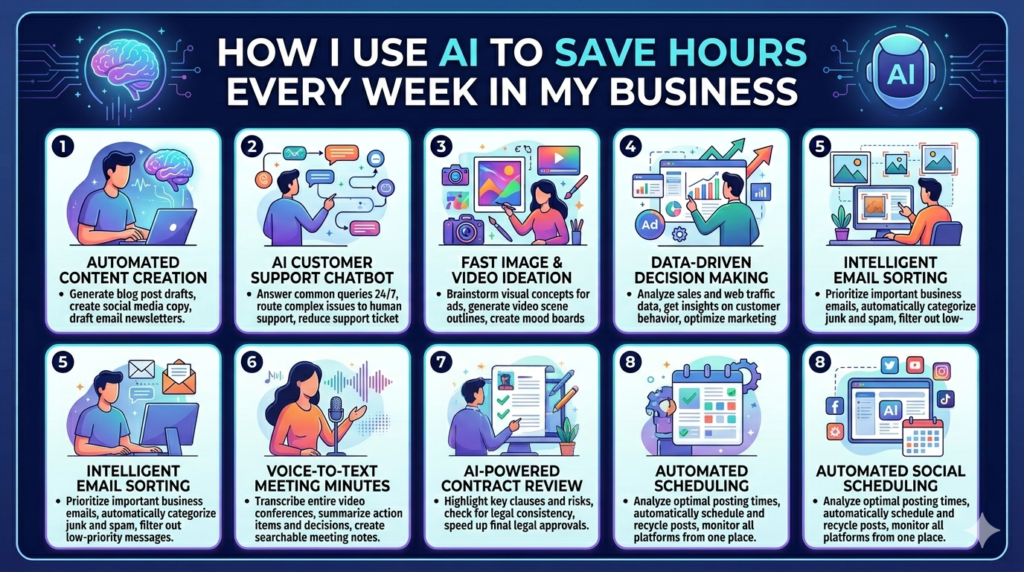
A lot of people think AI is only about generating content.
But honestly, the biggest advantage AI has given me is time.
Before using AI properly, I used to spend hours doing repetitive work:
- organizing ideas
- writing drafts
- researching competitors
- planning content
- analyzing data
- replying to messages
- brainstorming strategies
Now, many of those tasks take a fraction of the time.
And that matters because in online business, time is one of the most valuable assets you have.
The faster you can execute without sacrificing quality, the faster you grow.
In this article, I’ll break down the practical AI workflows I personally use to save hours every week in my business — without relying on robotic automation or low-quality shortcuts.
Why AI Became Part of My Daily Workflow
At first, I was skeptical about AI.
Like many people, I thought it was mainly:
- hype
- content spam
- generic writing tools
But after using it properly, I realized AI works best as:
- a productivity assistant
- a research partner
- an idea organizer
- a workflow accelerator
It doesn’t replace thinking.
It improves execution speed.
That’s the real value.
The Biggest Problem AI Solves for Me
Mental overload.
Running an online business usually means handling multiple things at once:
- client work
- content creation
- marketing
- strategy
- communication
- planning
- analytics
AI helps reduce the friction between ideas and execution.
Instead of wasting energy on repetitive tasks, I can focus more on:
- decision-making
- creativity
- growth
- strategy
Workflow #1 — Content Planning & Brainstorming
Coming up with fresh content ideas consistently is exhausting.
Especially when you’re managing:
- blogs
- social media
- YouTube ideas
- marketing campaigns
AI helps me speed up the planning phase dramatically.
How I Use It
I usually use AI to:
- brainstorm content angles
- generate blog structures
- organize ideas
- create topic clusters
- improve headlines
- identify audience pain points
Instead of staring at a blank page for an hour, I can start with a structured direction immediately.
That alone saves a massive amount of time every week.
Workflow #2 — Research & Information Organization
Research used to take me hours.
Especially when analyzing:
- competitors
- market trends
- customer feedback
- Amazon niches
- SEO opportunities
AI helps summarize and organize information quickly.
What This Helps Me With
Instead of manually filtering large amounts of information, AI can help identify:
- patterns
- recurring complaints
- customer behavior
- market opportunities
- content gaps
This makes decision-making faster and more focused.

Workflow #3 — Customer Review Analysis
This is one of the most useful AI workflows I use regularly.
When researching Amazon products or market opportunities, customer reviews contain valuable insights.
But reading thousands of reviews manually is time-consuming.
AI helps identify:
- repeated frustrations
- emotional triggers
- quality issues
- customer expectations
- improvement opportunities
That information becomes useful for:
- product development
- marketing
- listing optimization
- branding
Workflow #4 — Faster Content Drafting
AI has significantly improved my writing workflow.
I still edit heavily and add my own perspective, but AI helps accelerate:
- outlines
- rough drafts
- structure
- idea expansion
- formatting
This allows me to publish content much faster while maintaining quality.
Important Difference
I don’t use AI to replace human thinking.
I use it to reduce repetitive effort.
That’s a huge difference.
People can usually tell when content feels:
- robotic
- generic
- emotionless
The goal is still creating content that feels natural and valuable.
AI simply speeds up the process.
Workflow #5 — SEO Optimization
SEO involves many repetitive tasks:
- keyword organization
- content structuring
- optimization ideas
- internal linking
- metadata planning
AI helps simplify these workflows.
How This Saves Time
Instead of manually organizing everything, AI helps me:
- structure articles faster
- identify keyword opportunities
- improve readability
- generate content ideas
- organize SEO strategies
This makes publishing consistent content much easier.
Workflow #6 — Email & Communication Assistance
Writing repetitive messages can drain energy quickly.
AI helps speed up:
- client replies
- outreach drafts
- professional communication
- follow-ups
- proposals
I still personalize important conversations, but AI reduces repetitive writing workload significantly.

Workflow #7 — Social Media Content Systems
Social media consistency takes time.
AI helps me:
- repurpose content
- generate captions
- organize posting ideas
- brainstorm hooks
- improve engagement angles
This makes content production more efficient across platforms.
Why Repurposing Matters
One good idea can become:
- a blog post
- multiple tweets
- Instagram captions
- LinkedIn content
- short-form videos
- email topics
AI helps speed up that transformation process.
Workflow #8 — Productivity & Task Organization
One underrated AI use case is mental clarity.
I use AI to help organize:
- project plans
- task priorities
- workflow systems
- business ideas
- execution steps
Sometimes the biggest productivity problem is not lack of effort.
It’s lack of organization.
AI helps simplify complexity.
The Biggest Productivity Lesson I Learned
AI does not magically make people productive.
It amplifies how you already work.
If your systems are chaotic, AI may simply help you create chaos faster.
But if your workflows are structured, AI becomes extremely powerful.
Mistakes People Make With AI Productivity
1. Trying to Automate Everything
Not every task should be automated.
Human creativity and judgment still matter.
2. Publishing Raw AI Content
This is one of the fastest ways to damage quality.
AI-generated content should usually be:
- edited
- refined
- personalized
- improved
3. Depending Too Much on AI
AI should support thinking, not replace it.
Critical thinking is still a huge competitive advantage.
4. Using Too Many Tools
Many people waste time switching between dozens of AI platforms.
Simple workflows usually work better.
The Real Goal of AI Productivity
For me, AI is not about working less.
It’s about:
- reducing unnecessary effort
- improving execution speed
- freeing mental energy
- focusing on high-value work
That creates better long-term productivity.
My Personal Philosophy About AI
I think the people who benefit most from AI are the ones who:
- already have useful skills
- understand business
- think strategically
- know how to communicate
- focus on value creation
AI multiplies leverage.
It doesn’t replace capability.
Final Thoughts
AI has genuinely saved me countless hours every week.
Not because it magically runs my business.
But because it removes friction from repetitive workflows.
The biggest advantage is not automation alone.
It’s the ability to:
- move faster
- think clearer
- execute consistently
- focus on growth
And in 2026, businesses that combine human creativity with smart AI systems will have a major advantage over those still relying only on manual workflows.